EyesOnMeV
Members
-
Joined
-
Last visited
-
UFO: Aftershock [PC - Space geopolitics Simulation] Ver 1.2 - Cheat Activate cheat mode: Right click the UFO: Aftershock desktop icon, after click on properties and add the following command line parameter in target field: --options enable_system_console=true example: C:\Games\CENEGA\UFOAftershock\UFO.exe --options enable_system_console=true Must be a space between the added words and the target destination path. Save and normally start the game. During gameplay now you can bring up the system console by pressing the " ` " button on keyboard. Now you can enter one of the following codes in the command line and edit nearly all settings by only opening the System Console. ? - List of all possible codes win_mission - Instantly win mission untouch - Immortal solders full_heal - All units healed add_resource #, #, #, # - Additional Resources Etc........................................
-
UFO: Aftershock [PC - Space geopolitics Simulation] Ver 1.2 - Cheat Activate cheat mode: Right click the UFO: Aftershock desktop icon, after click on properties and add the following command line parameter in target field: --options enable_system_console=true example: C:\Games\CENEGA\UFOAftershock\UFO.exe --options enable_system_console=true Must be a space between the added words and the target destination path. Save and normally start the game. During gameplay now you can bring up the system console by pressing the " ` " button on keyboard. Now you can enter one of the following codes in the command line and edit nearly all settings by only opening the System Console. ? - List of all possible codes win_mission - Instantly win mission untouch - Immortal solders full_heal - All units healed add_resource #, #, #, # - Additional Resources Etc........................................
-
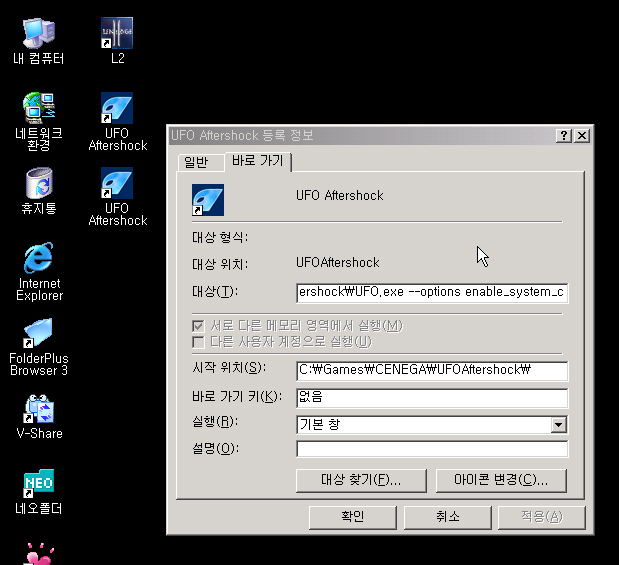
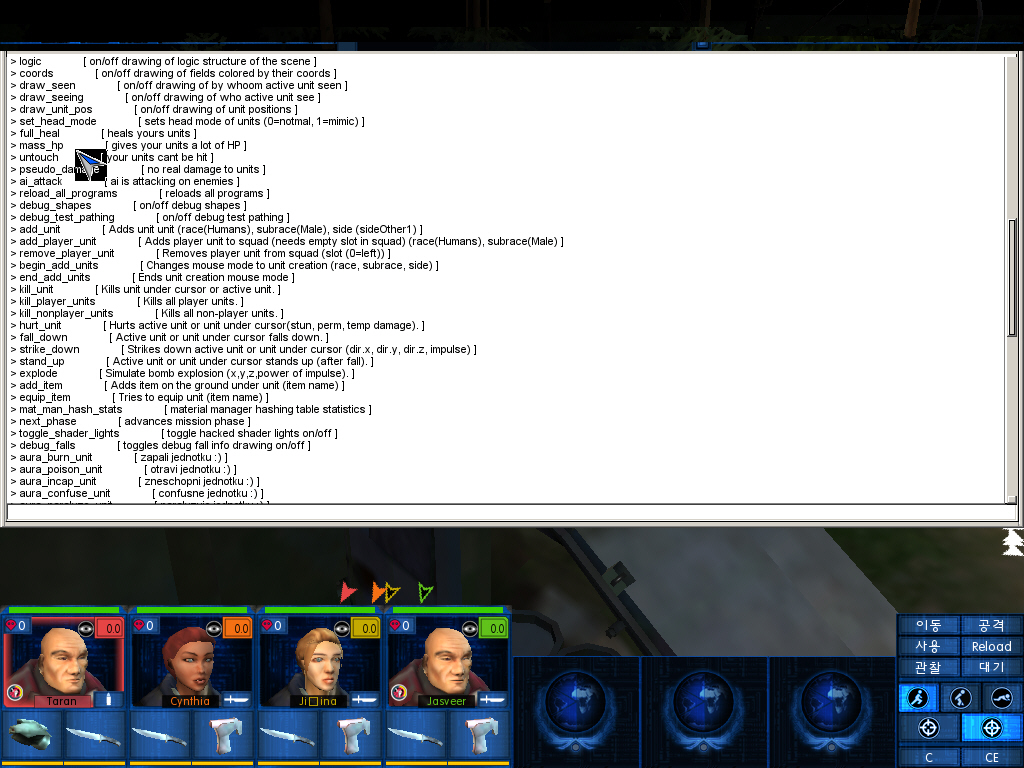
UFO: Aftershock [PC - Space geopolitics Simulation] Ver 1.2 - Cheat Activate cheat mode: Right click the UFO: Aftershock desktop icon, after click on properties and add the following command line parameter in target field: --options enable_system_console=true example: C:\Games\CENEGA\UFOAftershock\UFO.exe --options enable_system_console=true Must be a space between the added words and the target destination path. Save and normally start the game. During gameplay now you can bring up the system console by pressing the " ~ " button on keyboard. Now you can enter one of the following codes in the command line and edit nearly all settings by only opening the System Console. ? - List of all possible codes win_mission - Instantly win mission untouch - Immortal solders full_heal - All units healed add_resource #, #, #, # - Additional Resources Etc........................................ http://211.172.130.172/Snap1.jpg http://211.172.130.172/Snap2.jpg
-
UFO: Aftershock [PC - Space geopolitics Simulation] Ver 1.2 - Cheat Activate cheat mode: Right click the UFO: Aftershock desktop icon, after click on properties and add the following command line parameter in target field: --options enable_system_console=true example: C:\Games\CENEGA\UFOAftershock\UFO.exe --options enable_system_console=true Must be a space between the added words and the target destination path. Save and normally start the game. During gameplay now you can bring up the system console by pressing the " ` " button on keyboard. Now you can enter one of the following codes in the command line and edit nearly all settings by only opening the System Console. ? - List of all possible codes win_mission - Instantly win mission untouch - Immortal solders full_heal - All units healed add_resource #, #, #, # - Additional Resources Etc........................................